|
The queue is central to FTSpooler.
Each queue holds a set of rules for processing and
delivery of documents and may include any of these elements:
- Split Rules allow
document identification and optional
splitting into individual documents.
- Identified
documents or files may be formatted using a particular form
within a Data Folder. Identified
documents or files may also be redirected
to other queues for further processing, with no practical limit on the
number of redirections.
- Delivery processes
may output your formatted document by fax or email or to a printer,
with the address of the output being formed dynamically, or as an
attribute of the queue.
The common delivery processes normally do not
overlap, so “short cut” queue definitions are provided for print and
email as well as identification queues.

| Confirmation about Queue Parameters
Change |
|
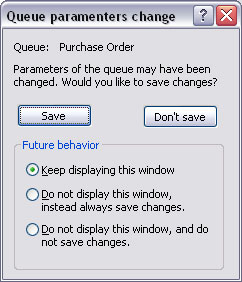
Making changes on any Queue Properties without clicking on the Apply
button will receive the pop up confirmation window. You also need to
decide on the Future behavior:
Keep displaying this window, Do not
display this window, instead always save changes, or Do
not display this window, and do not save changes.
Alternatively, the Save
changes option can be configured in the User
Interface under Setup - Settings
tab.
More information on Configuration on Save
changes Interface
|
|
| Top |
|