|
Comvita (NZ Medical Honey company) use a third party fulfillment
system in Hong Kong to fill orders and required an automated way to get
the data from their QAD picking/invoicing systems to the third
party. After discussion with TCG we designed a form to pass
the
data to the third party computer fulfillment system using
Separated Files produced from FormTrap.
You can output a CSV file using the Associated File command, like this:
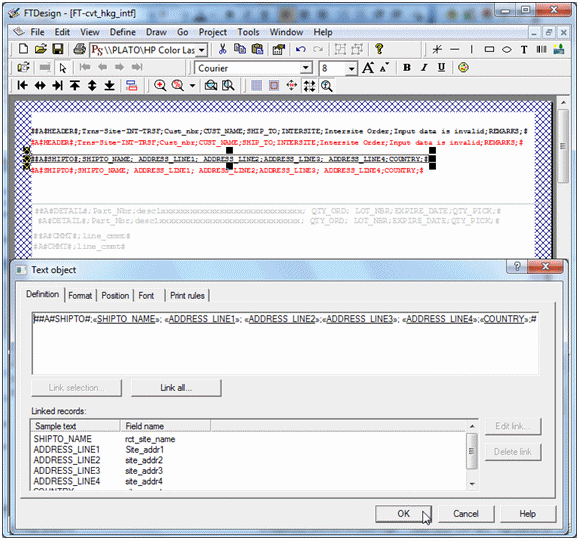
Here
we construct Associated File lines with all of the fields required,
starting with the ; (semi-colon) separator (so this is strictly a
semi-colon separated file). The same is done for the initial
"Header" portion and for each of the Detail and Comment lines as
well. The Red items are missing the initial #, hence print
and
are used for checking the output during testing. These are
taken
out for production (subsequent provision in FTDesign to look at the
Associated File now makes the red lines redundant).
This is the output.
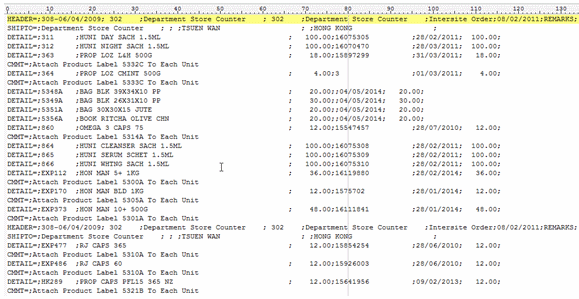
Spaces etc, can be removed if required by
masking and there is no “maximum length” on the output.
Please note these two items:
- Headings
are best done on the Trailer label (i.e. you get one record per input
document). Details will be produced as they occur so are in
sequence. This document has no "trailer" so the Associated
File
records for Header and Trailer are duplicated further down.
- The first character in the “detail”
section must be the separator.
Follow-up via Email from Customer, one month later:
Headers on a CSV file, only 1 required.
Hi Paul,
How do I prevent the HEADER from repeating if there are more than 1 pages?
We should only get the HEADER on top of page 1.
Cheers
Comvita
=================================
From: paul [mailto:paul.green@formtrap.com]
Hi Comvita,
Use Print Rules to do this only for "Page: 1" (on both Header fields).
=================================
Hi Paul,
Job done!
That was so easy thank you very much.
Cheers
Comvita
|
|