The Associated File is produced during
document formatting by the Spooler. If the form contains an Associated
File entry for SMTP Email (SMTPTo=emailto@domain.com) or the Email tab
within Queues contains a direct email to address, an email could be
sent.
These additional conditions are required to
send the email:
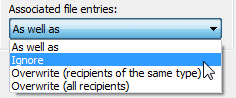
Queues, Process tab,
Associated file entries:
is NOT set to Ignore
Email
address is properly formed in the SMTPTo Associated File entry:
SMTOTo entries with blank email
addresses are ignored (effectively do not exist) Email addresses without an @ will cause SMTP to fail - they look like web sites - (see KB). Email
addresses with multiple @ or . (full stop) symbols will fail but SMTP
will be recovered after that transaction (from Version 7.4.004).
See KB. Assuming the above conditions are met, the Spooler will
fulfill the requirements of the Email tab within Queues and deliver the
email to SMTP. Delivery to SMTP is the Spooler's last connection
with SMTP Email, errors detected by SMTP will need to be followed up
via SMTP.
|