| |
|
| FTSpooler Setup |

|
|
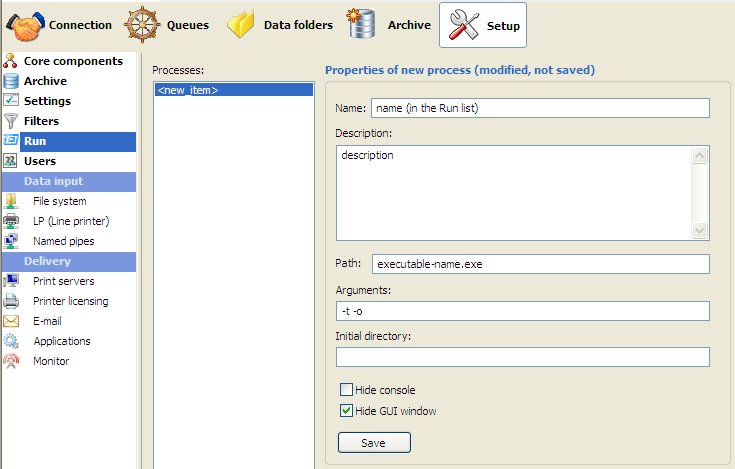
| Run |
This option allows addition or removal of process(es) that run
simultaneously with FTSpooler, but run independently. These processes
are started by FormTrap at the start of FTSpooler. Typical examples are
independent delivery services, such as Prodocom Fax Service which is a
delivery “agent” on the same computer as the FTSpooler.
To add a process:
- Click the New
button.
- Name the
process and provide a brief Description.
- Enter the Path
to the process. Path could be in absolute
form, or relative to the FTSpooler’s Installation
Directory (%ftinst%) or any other directory specified by
the ‘PATH’ System environment variable. For the purpose of maximum
portability it is recommended to place all executables in the
%ftinst% directory and specify just the executable name
(without path).
- Enter the command line Arguments.
You are responsible for correctly quoting the command line arguments.
- Initial directory
is usually left empty. In this case it defaults to the executable’s
location.
- Check other options if applicable:
- Hide console
- Hide GUI window
- Click the Save
button.
To delete a process:
- Select the process to be deleted.
- Click the Delete
button.
- Confirmation dialog box pops up.
- Click Yes
to finish.
|
|
| Top
|
|
|
|


 Note: These are mutually exclusive, the application will either be: a
Windows program (in which case Hide console
will cause an error) or a command line program (in which case
Hide GUI window will cause an error)
Note: These are mutually exclusive, the application will either be: a
Windows program (in which case Hide console
will cause an error) or a command line program (in which case
Hide GUI window will cause an error)